Production Grade Homelab #2: Ansible — No More SSH and Pray



 👍
👍

Part 1 gave me eyes. Prometheus was scraping 18 targets, Grafana showed me every container state, and Alertmanager was firing Telegram messages when things went wrong. But there was a problem: when Prometheus told me something needed fixing, I still had to SSH into a box and do it by hand.
Fourteen boxes. Nine groups. One SSH session per fix. And if I ever needed to enforce something consistently across all of them — a masked systemd service, a timezone, a helper script — I was doing it manually, trusting memory, and hoping I hadn't missed a host.
That's not production grade. That's just a monitoring-flavoured form of chaos.
So Part 2 is about fixing the other half: if Part 1 is seeing, Part 2 is doing. This weekend I built a full Ansible layer for the homelab — 7 roles, a Jinja2-templated Caddyfile, Gitea Actions CI, and a Semaphore web UI so I don't even need a terminal to trigger a playbook.
The Goal
One command — ansible-playbook playbooks/site.yml — should enforce known-good state
across every host. Run it once, it applies what's needed. Run it again, it changes nothing.
That's the idempotency bar. Anything short of that isn't IaC, it's just a script with a fancy name.
The Inventory: 15 Hosts, 9 Groups
The homelab has grown to 15 systems: two Proxmox nodes, nine LXC containers, a VM, two storage nodes, and a cloud VPS. Ansible organises them into role-based groups that map directly to how I think about the stack:
| Group | Hosts |
|---|---|
role_hypervisor | pve, pve2 |
role_dns | adguard (CT101) |
role_proxy | caddy (CT102) |
role_media | media-servers (CT103) |
role_automation | telegram-bot (CT105) |
role_nvr | scrypted (CT106) |
role_download | arrstack (CT107) |
role_utilities | utilities (CT108) |
role_services | unbound (CT110), monitoring (CT111) |
role_ai | hermes-vm (VM100) |
role_storage | unraid, pbs |
jarvis_group | jarvis (Oracle Cloud ARM — ubuntu user, sudo) |
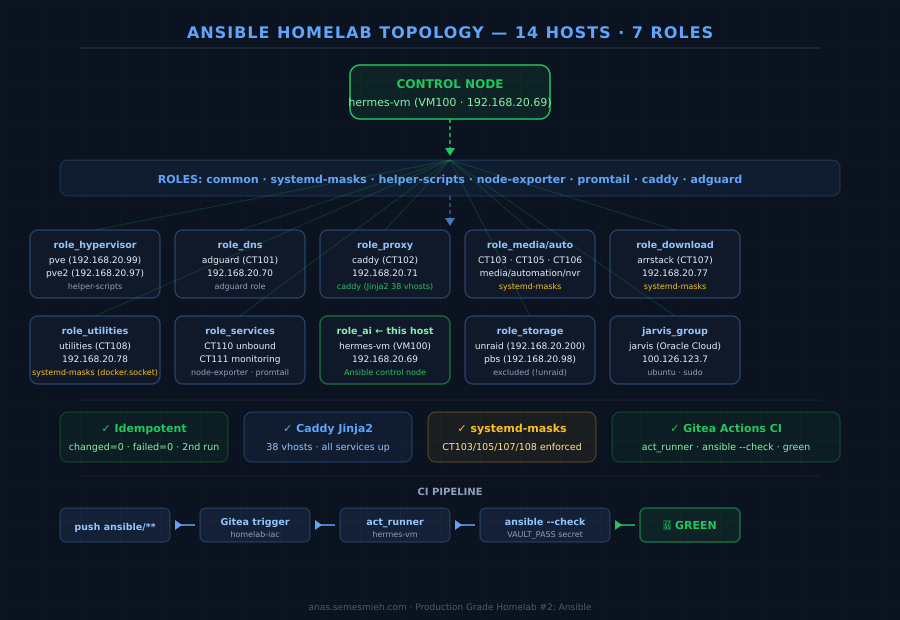
Unraid isn't managed by Ansible — it's BusyBox Linux with no Python, no apt, no systemd. Its
node_exporter was already deployed via Docker in Part 1, and Ansible can't do anything
useful there that I'm not already doing another way. So it's excluded from all plays with
all:!unraid and documented as intentional.
The Roles
Seven roles, each with a tight scope. Nothing sprawling, nothing that does "everything".
common
Timezone and base packages. One pitfall immediately: community.general.timezone throws
"Access denied" on unprivileged LXC containers. The module tries to write to systemd's clock interfaces
which aren't available inside a container. Fix: use the raw timedatectl command with
failed_when: false — it works on the containers that support it and silently skips the rest.
systemd-masks
This one exists because of an incident. After the August 11 HA maintenance window, three containers
(CT103/105/107) failed to come back up reliably because ifupdown-wait-online.service was
blocking Docker for several minutes on each boot. And CT108 had a docker.socket issue
causing systemd deadlocks. Both are now permanently masked by this role — enforced on every run,
verified idempotently.
helper-scripts
ha-reenable.sh and pve2-backup-wrapper.sh — both extracted directly from
pve2 and committed to the repo. These scripts were previously "somewhere on pve2" with no version
control. Now they're in git, and Ansible deploys them to both hypervisor nodes every run.
node-exporter
Idempotent adoption of the Phase 1 manual installs. Detects whether v1.8.2 is already present and
skips the download if it is. ARM64-aware (Jarvis runs on Oracle Cloud ARM). One wrinkle: the
download → extract → install chain fails in --check mode because --check
pretends the download happened but doesn't actually write the file. Fix: wrap the entire install block
with when: not ansible_check_mode — a pattern I ended up applying to the promtail role too.
promtail
Phase 1 only had Promtail on CT111 (the monitoring host itself). This role extends Loki log ingestion
to all 14 Debian hosts. Same ansible_check_mode guard as node-exporter. Handlers also
need ignore_errors: "{{ ansible_check_mode }}" — if the service doesn't exist yet (first
install), the handler fails in check mode when it tries to restart a nonexistent service.
caddy
This is the one I was most nervous about. The Caddyfile has 38 vhosts. Getting it wrong takes down
every service. The role uses a Jinja2 template that splits the config into two parts: a loop over
caddy_simple_vhosts (the straightforward reverse_proxy entries) and a set
of hardcoded special blocks for the complex cases — Plex with header rewrites, Scrypted with
tls_insecure_skip_verify, the Telegram webhook with path-based routing, Prometheus with
header_up Host {upstream_hostport} (skip this and Prometheus returns redirect loops).
One thing to avoid: Ansible's validate: parameter on template tasks. Caddy's validator
is strict about formatting — it rejects templates that aren't run through caddy fmt first,
even when the config is functionally valid. Remove validate: and rely on the
caddy reload handler to surface real errors instead.
After the template landed, I verified every service was still reachable. All 38 up.
adguard
Currently a health probe — it calls the AdGuard API to confirm it's reachable and logs the rewrite count. Full template management (Jinja2 for all DNS rewrites, atomic with Caddy changes) is planned for the next iteration. Getting it right without a test environment means being deliberate, and the existing setup is stable.
The site.yml Playbook
Running everything in sequence, hosts targeted by group:
- import_playbook: ping.yml          # all:!unraid

- name: Common — all Debian hosts
  hosts: all:!unraid
  roles: [common]

- name: Node Exporter + Promtail — all Debian hosts
  hosts: all:!unraid
  roles: [node-exporter, promtail]

- name: Systemd masks — pve2 CTs
  hosts: role_media:role_automation:role_download:role_utilities
  roles: [systemd-masks]

- name: Helper scripts — hypervisors
  hosts: role_hypervisor
  roles: [helper-scripts]

- name: Caddy — CT102
  hosts: caddy
  roles: [caddy]

- name: AdGuard — CT101
  hosts: adguard
  roles: [adguard]
The idempotency test: run it twice. Second run must show changed=0, failed=0 across
all 14 hosts. It does.
The CI: Gitea Actions on hermes-vm
Every push to ansible/** triggers an ansible-playbook --check run.
The runner is act_runner v0.2.11 running as a systemd service on hermes-vm.
actions/checkout@v4 action pulls from GitHub. When your runner is behind
a private network, that fails silently — the step completes but your code is never fetched.
Fix: skip the checkout action entirely and use a direct git pull in the workflow step.
The repo is already cloned on hermes-vm at ~/homelab-iac.
- name: Pull latest code
  run: cd /root/homelab-iac && git pull origin main

- name: Run ansible --check
  run: |
    cd /root/homelab-iac/ansible
    echo "${{ secrets.VAULT_PASS }}" > .vault_pass
    chmod 600 .vault_pass
    ansible-playbook playbooks/site.yml --check
    rm -f .vault_pass
Also: the act_runner download URL matters. The /latest/ path on
dl.gitea.com returns a 0-byte file. Use the versioned URL:
https://dl.gitea.com/act_runner/0.2.11/act_runner-0.2.11-linux-amd64.
Vault and Secrets
Ansible Vault encrypts inventory/group_vars/all/vault.yml. The vault password lives
in .vault_pass on hermes-vm (gitignored). In CI, it's injected via a Gitea repo secret.
The workflow writes it to a temp file, runs the playbook, then deletes it — even on failure, via
the always-runs rm -f.
LXC Containers Are Not VMs
A few Ansible modules that work fine on VMs will quietly fail on unprivileged LXC containers. The ones I hit:
community.general.timezone— "Access denied". Usecommand: timedatectl set-timezone ...withfailed_when: falseinstead.ansible.posix.sysctl— "permission denied on key vm.swappiness". Containers share the host kernel's sysctl namespace. Skip it entirely for LXC hosts, or guard withansible_virtualization_type not in ['lxc', 'container'].- Handlers for services that don't exist yet — in
--checkmode, if a service isn't installed, the handler that tries to restart it will fail. Addignore_errors: "{{ ansible_check_mode }}"to the handler.
The Caddyfile Is Now in Git
This is the change I'm happiest about. Before, adding a new service meant SSHing into CT102, editing
the Caddyfile by hand, hoping I didn't break indentation, reloading Caddy, and then separately SSHing
into CT101 to add the AdGuard DNS rewrite. Now it's: add the upstream to caddy_vars.yml,
push to git. CI validates it. The next playbook run deploys it.
The fact that the Caddyfile is a Jinja2 template and all 38 vhosts are declared in variables means I can read the entire reverse proxy config from one YAML file without touching a server.
Semaphore: A Web UI for When You Don't Want a Terminal
Ansible is CLI-native. That's fine most of the time. But sometimes you want to trigger a playbook from a phone, or hand off a specific run to someone who doesn't know Ansible, or just have a browsable history of "what ran when and what changed."
Semaphore UI is a lightweight Go web app (single Docker container, SQLite backend) that wraps Ansible playbooks in a clean interface. It runs on CT108 alongside Homepage and Dockhand. Deploy it:
services:
  semaphore:
    image: semaphoreui/semaphore:latest
    container_name: semaphore
    ports:
      - 3002:3000
    environment:
      - SEMAPHORE_DB_DIALECT=sqlite
      - SEMAPHORE_ADMIN=<your-username>
      - SEMAPHORE_ADMIN_PASSWORD=<strong-password>
      - SEMAPHORE_ACCESS_KEY_ENCRYPTION=<base64-32-bytes>
      - TZ=Australia/Sydney
    volumes:
      - semaphore_data:/var/lib/semaphore
      - /root/.ssh:/root/.ssh:ro
      - /root/homelab-iac:/home/runner/homelab-iac:ro
restart: unless-stoppedSEMAPHORE_ACCESS_KEY_ENCRYPTION contains characters outside the base64 alphabet.
Generate it with: python3 -c "import base64,os; print(base64.b64encode(os.urandom(32)).decode())"
Once it's up: create a Project, add your SSH key to the Key Store, point a Repository at the
homelab-iac Gitea repo, create an Inventory pointing at ansible/inventory/hosts.yml,
then create Task Templates (type: Task) for each playbook. You can now run site.yml or
caddy-adguard.yml or any health check playbook from a browser.
What's Actually in Git Now
The anas/homelab-iac repo on Gitea currently has:
- 7 roles: common, systemd-masks, helper-scripts, node-exporter, promtail, caddy, adguard
- 6 playbooks: site.yml, ping.yml, caddy-adguard.yml, docker-health.yml, backup-verify.yml, nfs-health.yml
- Encrypted vault.yml committed — secrets never in plaintext
- Ansible.cfg with roles_path, vault_password_file, pipelining enabled
- Gitea Actions CI — green badge on every push to
ansible/** - ha-reenable.sh + pve2-backup-wrapper.sh — previously only lived on pve2, now version-controlled
What I Didn't Do (Yet)
The docker-stacks role exists in the repo but isn't implemented. Docker Compose stacks
are currently managed by homelab-compose + a compose-sync cron on CT108 — that works
well and Ansible replacing it adds complexity without much gain at this stage. Same with full
AdGuard template management — the API requires credentials and the current setup is stable, so
that's a Phase 2 v2 item.
Done Gates
- ✓
ansible all -m ping→ 14/14 green (Unraid excluded by design) - ✓
ansible-playbook site.yml→ idempotent (second run: changed=0, failed=0) - ✓ Caddy Jinja2 template live — all 38 vhosts serving, verified after deploy
- ✓ ha-reenable.sh committed to git and deployed to both hypervisors
- ✓ systemd-masks enforced on CT103/105/107 (ifupdown) and CT108 (docker.socket)
- ✓ node_exporter + promtail on all 14 Debian hosts (Loki getting logs from everywhere)
- ✓ Gitea Actions CI — green badge
Next up: Phase 3 — Terraform. New CTs and VMs declared in HCL,
provisioned via terraform apply, state in Gitea HTTP backend.
No more clicking through the Proxmox UI.