Challenge Accepted: Self-Hosting a Telegram Video Bot with n8n and yt-dlp
A friend mentioned offhand that he’d love a tool that lets you send a video link to a chat and get the file back — no browser, no app, no ads. I said “challenge accepted” and went quiet for a day. This is what came out of it.
The result: a self-hosted Telegram bot that accepts any URL supported by yt-dlp, presents a quality picker (480p / 720p / 1080p / audio only), downloads the file on a dedicated LXC, and either sends it directly in chat or returns a signed expiring download link for larger files. Everything runs on my homelab. Nothing touches a third-party service except the Cloudflare tunnel for ingress.
The Stack
CT105 is the dedicated container for this — 4 vCPU, 8 GB RAM, 100 GB local NVMe on Proxmox, sitting at 192.168.20.75. Four Docker services run on it, each with a single responsibility:
| Service | Image | Port | Role |
|---|---|---|---|
telegram-bot-api |
aiogram/telegram-bot-api | 8081 | Local Bot API server (bypasses Telegram’s 50 MB upload cap) |
ytdlp-worker |
custom FastAPI | 8090 | Runs yt-dlp + ffmpeg, exposes POST /download and POST /publish |
files-api |
custom FastAPI | 8088 | Serves files via HMAC-SHA256 signed, expiring URLs |
n8n |
n8nio/n8n | 5678 | Workflow orchestrator — the glue between everything |
The local Bot API server is the key architectural choice. Telegram’s public API caps file uploads at 50 MB. Running the server locally removes that cap for outgoing files, which matters a lot for 1080p video. The tradeoff is that Telegram still receives the file — you just bypass the upload restriction because the local server handles the transfer to Telegram’s infrastructure differently.
n8n is the orchestrator. The whole point of using it here is to avoid writing glue code. The download logic, the delivery decision, the error handling — all of it lives in a visual workflow rather than a custom Python service that I’d have to maintain separately.
How It Works
The user flow is straightforward, but there are two distinct phases that happen at different times:
For files under 50 MB, the worker returns the local path and n8n sends it directly via the local Bot API server. For anything larger, the worker publishes it to the NAS and the files-api generates a signed URL that expires after a set window. The user gets a download link instead.
Here’s the bot in action:
Wiring the Edges
Three infrastructure pieces connect the bot to the outside world:
AdGuard DNS rewrite — hook.semesmieh.com and n8n.semesmieh.com resolve internally to CT102 (Caddy) at 192.168.20.71. The same names resolve externally via Cloudflare.
Caddy on CT102 — reverse-proxies hook.semesmieh.com and n8n.semesmieh.com to http://192.168.20.75:5678, with automatic TLS via the Cloudflare DNS plugin. The Caddyfile entries are minimal — one reverse_proxy directive each.
Cloudflare tunnel — each public hostname points directly at http://192.168.20.75:5678. This matters: early in the build I had the tunnel pointing at https://192.168.20.71 (Caddy). That caused TLS handshake failures because the tunnel was trying to verify Caddy’s internal cert. Pointing it straight at n8n over plain HTTP removed the problem entirely.
Webhook registration is a one-time curl call:
curl -X POST "https://api.telegram.org/bot${BOT_TOKEN}/setWebhook" \
  -d "url=https://hook.semesmieh.com/webhook/telegram-bot" \
  -d "secret_token=${TELEGRAM_WEBHOOK_SECRET}"
After that, every message Telegram delivers to the bot hits n8n directly.
The n8n Workflow
Here’s the full workflow visualized — 25 nodes orchestrating the entire request lifecycle from webhook ingestion through delivery:
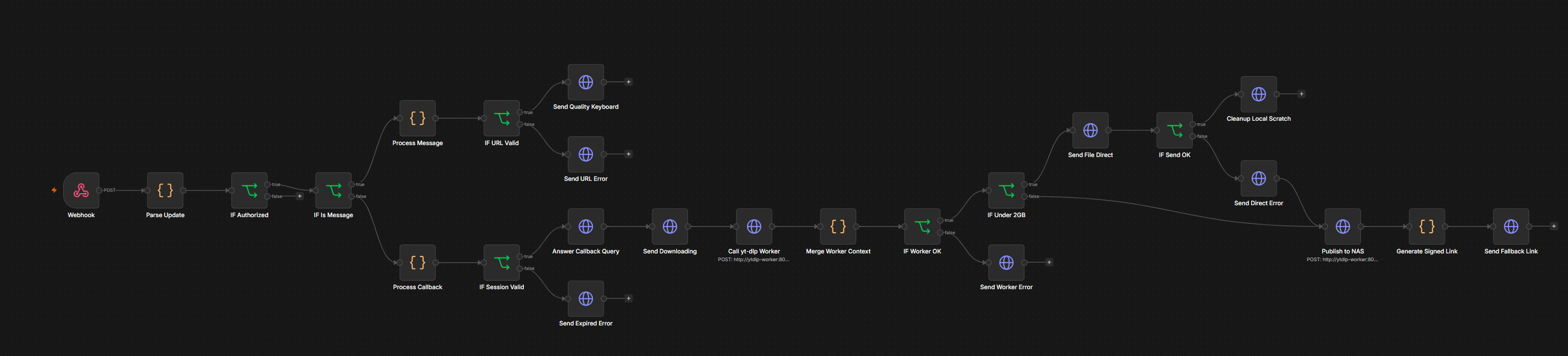
The workflow has 25 nodes. Most of them are simple HTTP Request or Send Message nodes. The interesting ones are the Code nodes that handle session state and routing logic:
- Parse Update — extracts
chatId,messageId,text, andcallbackDatafrom the raw Telegram payload. Also surfaces the webhook secret for the auth check. - IF Authorized — compares the incoming secret against
$env.TELEGRAM_WEBHOOK_SECRETand checks the sender’s user ID against$env.TELEGRAM_ALLOWED_USER_IDS. Unauthorized requests get a 403 and stop. - Process Message — validates the URL and stores
{ chatId, url, jobId }in workflow static data so the callback handler can retrieve it later. - Process Callback — reads the stored session, pairs it with the chosen quality, and hands everything downstream.
- Call yt-dlp Worker — POSTs to
http://192.168.20.75:8090/downloadwith the URL, quality, and job ID. Waits for completion (synchronous for now). - IF Size OK — routes based on file size. Under 50 MB: send directly. Over: publish and sign.
- Generate Signed Link — calls the files-api with
$env.FILES_SIGNING_SECRETto produce a time-limited URL. Uses the Node.jscryptomodule (enabled viaNODE_FUNCTION_ALLOW_BUILTIN=cryptoin the compose env). - Send Worker Error / Send Direct Error — dedicated error nodes so no path through the workflow ends silently. More on this below.
Four Things That Fought Back
The infrastructure setup was mechanical. The workflow debugging was not. Four specific n8n behaviours caused most of the pain.
1. The Code Node Sandbox Blocks More Than You Think
n8n runs Code nodes in a V8 isolate. Two things I reached for instinctively were blocked:
process.env throws inside Code nodes by default. The fix is either adding N8N_BLOCK_ENV_ACCESS_IN_NODE=false to the environment, or — better — using $env.VARIABLE_NAME inside IF node expressions, which runs outside the sandbox. I moved all secret comparisons to IF nodes and only kept $env in Code nodes where truly needed.
new URL(url).hostname throws silently. There’s no error output, no red node — the expression just returns empty. I spent longer than I’d like to admit on this one. The fix is a regex:
const hostMatch = url.match(/^https?:\/\/([^/?#:]+)/);
const hostname = hostMatch ? hostMatch[1] : null;
It’s less elegant but it works. The lesson: when a Code node silently produces no output, assume something is throwing — not that your logic is wrong.
2. Context Disappears After HTTP Nodes
The workflow calls answerCallbackQuery to dismiss the loading spinner on the Telegram keyboard. That’s a Telegram API HTTP call. After it completes, $json in every downstream node becomes { "ok": true } — Telegram’s response. Every field from Process Callback (chatId, url, quality, jobId) is gone.
The fix is to stop relying on $json and always reference the upstream node explicitly:
// Instead of $json.chatId (wrong after any HTTP node)
$('Process Callback').first().json.chatId
Every node that runs after Answer Callback Query uses this pattern. It’s repetitive but unambiguous — you always know exactly where the data is coming from.
3. Static Data Scope: ‘node’ vs ‘global’
I used $getWorkflowStaticData('node') to store session state in Process Message and retrieve it in Process Callback. It returned empty every time. The reason: 'node' scope is per-node, so each Code node sees only its own isolated store. Two different nodes writing and reading 'node'-scoped data are completely invisible to each other.
// Wrong — each node sees a different store
const store = $getWorkflowStaticData('node');

// Correct — shared across the entire workflow
const store = $getWorkflowStaticData('global');
This is documented, but it’s the kind of thing you only notice when cross-node state silently fails. Both Process Message and Process Callback now use 'global'.
4. The Cloudflare Tunnel 502
After the webhook was registered and verified, the first real messages resulted in 502 Bad Gateway. The tunnel configuration had the origin set to https://192.168.20.71 — the Caddy CT. The tunnel was trying to establish a TLS connection to Caddy, which presented an internal self-signed cert. The tunnel rejected it. Everything backed up silently.
The fix was to point each Cloudflare tunnel hostname directly at the target service over plain HTTP:
| Hostname | Old origin | New origin |
|---|---|---|
| hook.semesmieh.com | https://192.168.20.71 | http://192.168.20.75:5678 |
| n8n.semesmieh.com | https://192.168.20.71 | http://192.168.20.75:5678 |
Caddy still handles TLS for internal access. For the Cloudflare tunnel, the connection is encrypted by Cloudflare on the public side — the internal hop from the tunnel daemon to n8n can be plain HTTP without any security compromise.
Never Go Silent
The design principle I kept coming back to: every path through the workflow must send the user a message. A bot that silently fails is worse than useless because you don’t know whether to retry or wait.
Two failure paths were initially silent:
yt-dlp worker errors — when yt-dlp returns an error (403 Forbidden, private video, geo-block), the raw output looks like ERROR: [youtube] abc123: This video is unavailable. The Send Worker Error node strips the prefix and shows the user something readable:
// In the error message expression
{{ $json.error.replace(/^ERROR:\s*/, '').replace(/\n$/, '').slice(0, 300) }}
Direct send failures — if the Telegram API rejects the direct file send (size edge case, API error), there was originally no handler. Adding a Send Direct Error node on the false branch of IF Send OK closed that gap. The user gets “Could not send file directly — here’s a download link instead” and the workflow falls through to the publish path.
What It Feels Like to Use
You paste a URL. Two seconds later you get an inline keyboard. You tap a quality. You get “Downloading…” almost immediately, then the file arrives. For small files it’s in the chat itself. For large ones it’s a link. The whole interaction feels like a native feature of Telegram rather than a bot you’re talking to.
The challenge turned out to be less about yt-dlp — that part was half an hour of work. The real challenge was understanding n8n’s execution model well enough to trust it. Once you know where context lives, where it disappears, and which scopes are shared, the workflow snaps into place. Before you know those things, you spend a lot of time staring at empty $json objects wondering what went wrong.
The friend who issued the challenge has been using it since. Challenge: done.