Homelab Brain Transplant: Giving Hermes a Proper Linux Home

Earlier this year I wired Hermes into my homelab — an AI agent running locally, connected to Telegram, with memory, skills, cron jobs, and a Mnemosyne dashboard. It worked well. It worked from my Windows laptop. And that was quietly the problem all along.
Closing the lid killed Telegram. A restart needed the startup scripts to fire in the right order. A reboot during a long cron job meant silent data loss. The agent had a brain, but the brain lived in the wrong body. Today I fixed that.
Why the transplant was overdue

There were four compounding reasons, each enough on its own:
- Single point of failure. The Telegram gateway ran as a Windows startup script. Laptop closed, lid down, or Windows Update deciding it's reboot time at 3am? Gateway dead. No messages delivered, no cron jobs fired, no agent.
- Startup scripts are not services. There's a reason Linux has systemd. Startup scripts don't restart on failure, don't log to a structured journal, don't have dependency ordering, and don't survive logout. Running a long-lived agent process this way was always a workaround, not a solution.
- Windows was never the right home. Hermes is a Linux-native tool. Running it on Windows meant dealing with CRLF line endings corrupting
.envfiles, path separators scattered through config and cron job prompts, no native rsync, and Electron needing extra flags to work at all on a real Linux desktop. - Blast radius on compromise. An AI agent with terminal access, SSH keys, GitHub credentials, and Telegram access is a high-value target. Running it on my daily-use laptop means a compromise takes everything with it. A VM is isolated by design — it has its own network namespace, its own disk, and a PBS backup that means worst case is a rollback, not a full laptop wipe.
Picking the body
The VM landed on the same Proxmox node that hosts the rest of my homelab. The spec is deliberately modest — this is an agent, not a model host:
| Property | Value |
|---|---|
| OS | Debian 13 (Trixie) |
| CPU | 4 vCPU |
| RAM | 8 GB |
| Disk | 80 GB SSD-LVM |
| IP | 192.168.20.69 (static) |
| Tailscale | 100.125.95.69 |
| Desktop | XFCE + xrdp |
Debian 13 over Ubuntu because it's lighter, and I already had the pattern from previous LXC work. XFCE because Hermes has an Electron desktop app and I needed a real display server for it — not just a headless server. Tailscale from day one because the agent needs to reach Gitea on another node, and Tailscale makes that a non-event.
The migration plan
I broke it into 12 phases with a hard rule: Windows stays primary until Phase 11. The Telegram gateway stayed running on the laptop through all the setup, config, and testing. Only at the end, once everything was verified, did I stop Windows and start the VM.
| Phase | What |
|---|---|
| 1–4 | VM creation, networking, Tailscale, desktop, Hermes + Copilot auth |
| 5 | Migrate Mnemosyne DB, skills, SSH keys, cron jobs, config, scripts |
| 6 | Clone repos (Gitea + GitHub), set per-repo git identities, fix paths |
| 7 | systemd services for gateway + Mnemosyne dashboard |
| 8 | Update Caddy: h-mem.semesmieh.com → 192.168.20.69:8765 |
| 9 | Activate crons on VM, pause on Windows |
| 10 | Validation pass — SSH, git, Mnemosyne, Tailscale, browser |
| 11 | Cutover — start VM gateway, stop Windows gateway |
| 12 | PBS backup + Proxmox snapshot, decommission Windows Hermes |
What moved and how
Phase 5 was mostly mechanical but had a few wrinkles worth noting. No rsync on Windows — so everything was piped through SSH using tar:
cd "C:/Users/anass/AppData/Local/hermes/"
tar czf - skills/ | ssh [email protected] "tar xzf - -C ~/.hermes/"
The Mnemosyne SQLite database migrated cleanly with a straight scp of the .db, .db-shm, and .db-wal files. SSH key pairs all transferred with scp, then chmod 600 on the VM.
The trickier part was path cleanup. The Windows config, cron job prompts, and skill files all contained paths like C:/Users/anass/Desktop/Homelab or /c/Users/anass/.ssh. A few targeted sed passes replaced them with /home/anas/. The .env file also arrived with Windows CRLF line endings — which silently corrupted the Telegram bot token until I ran sed -i 's/\r//' ~/.hermes/.env.
\r that made it invalid. Always strip Windows line endings from any file transferred to Linux.
Making it a proper service
Rather than manually creating systemd unit files, I used hermes gateway install — which writes a proper user-level systemd service, enables linger so it survives logout, and registers it under ~/.config/systemd/user/. The gateway runs as the anas user, not root.
hermes gateway install
# Creates ~/.config/systemd/user/hermes-gateway.service
# Enables linger: loginctl enable-linger anas
# Starts the service

systemctl --user status hermes-gateway
The Mnemosyne dashboard runs as a separate systemd system service on port 8765, fronted by Caddy with TLS. Updating Caddy was a one-liner:
# /etc/caddy/Caddyfile on 192.168.20.71
h-mem.semesmieh.com {
  reverse_proxy http://192.168.20.69:8765  # was 192.168.20.5
}
One mistake I made: I initially hand-wrote a system-level /etc/systemd/system/hermes-gateway.service unit. This conflicted with the user-level service that hermes gateway install creates, leading to confusing behaviour where hermes gateway status and systemctl status hermes-gateway reported different things. Lesson: let Hermes manage its own service file.
The gotchas
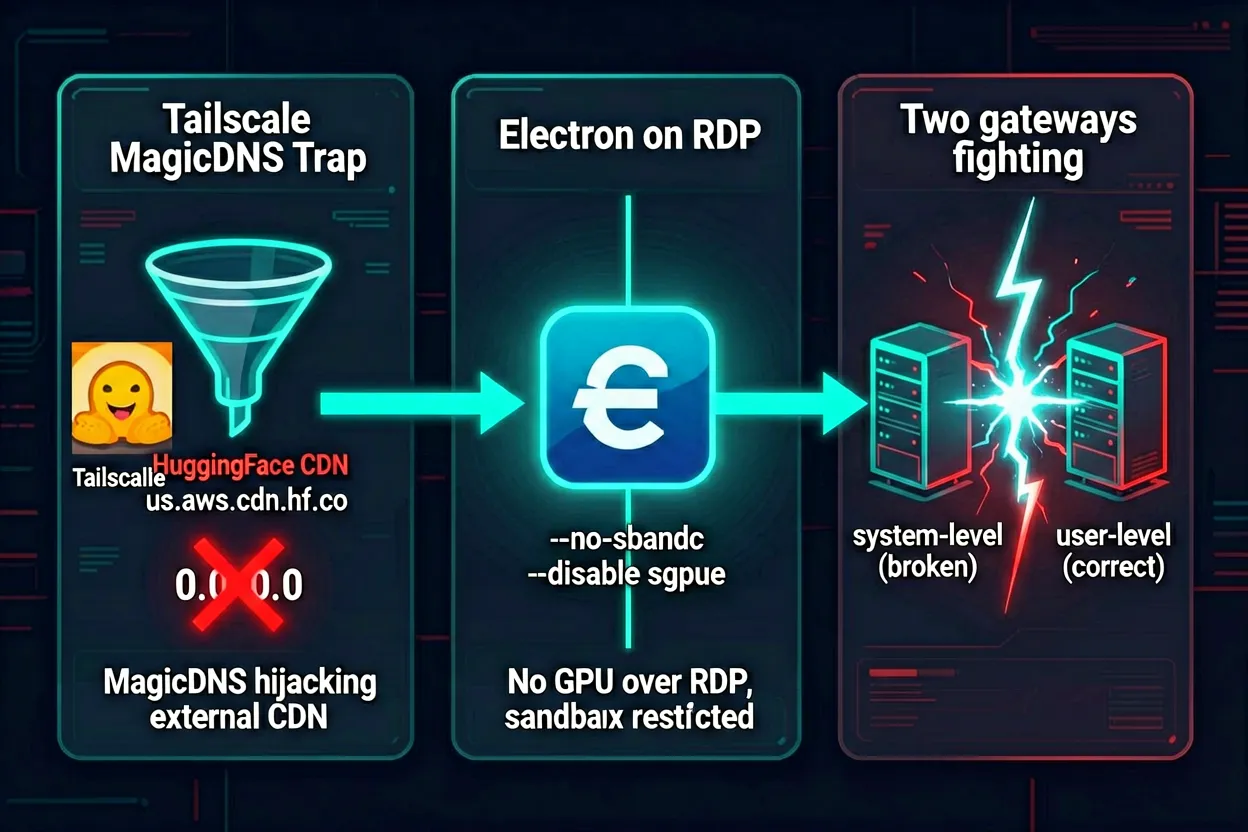
The happy path took about two hours. The gotchas took another two. Here's what bit me:
1. Tailscale MagicDNS blocking HuggingFace CDN
On first message after cutover, Telegram showed "typing" — and nothing came back. The gateway logs showed it was stuck loading the fastembed embedding model for Mnemosyne. The model download was hanging silently.
The culprit: Tailscale MagicDNS was resolving us.aws.cdn.hf.co (HuggingFace's CDN) to 0.0.0.0, making the download silently fail with a connection refused. The fix was to temporarily disable MagicDNS, download the model, then re-enable:
tailscale set --accept-dns=false
curl -L 'https://huggingface.co/qdrant/bge-small-en-v1.5-onnx-q/resolve/main/model_optimized.onnx' \
  -o ~/.hermes/cache/fastembed/models--qdrant--bge-small-en-v1.5-onnx-q/snapshots/.../model_optimized.onnx
tailscale set --accept-dns=true
Once the 64MB ONNX model is cached locally, this never happens again. But it's a gotcha worth knowing: any Tailscale node that uses MagicDNS with custom split-DNS may block external CDNs that happen to share a pattern with internal names.
2. Electron crashing silently on RDP
Running hermes desktop in the XFCE terminal launched the process, printed a few lines, and exited with no obvious error. Two flags fixed it:
/path/to/Hermes --no-sandbox --disable-gpu--no-sandbox: Electron normally uses Linux kernel user namespaces for renderer process sandboxing. Debian 13 restricts unprivileged user namespaces by default — the sandbox fails to start and the whole app exits. This flag disables the sandbox layer. Safe on a personal VM you control.--disable-gpu: Over RDP there's no GPU. Electron's GPU process crashes trying to initialise hardware acceleration that doesn't exist, taking the main process with it. Software rendering works fine over RDP.
These flags are standard for Electron in VM/container/RDP environments. I updated the launcher wrapper script to pass them unconditionally on this host.
3. Stale Chromium systemd scopes
Every crashed Electron instance leaves a stale app-org.chromium.Chromium-XXXXX.scope registered in the user systemd session. The next launch tries to register a new scope with the same base name, hits UnitExists, logs an error, and exits. The launcher now runs a cleanup step first:
systemctl --user stop "app-org.chromium.Chromium*.scope" 2>/dev/null || true
systemctl --user reset-failed 2>/dev/null || true
4. Two gateway services fighting each other
During setup I hand-wrote a system-level unit file for the gateway, then later ran hermes gateway install which created a user-level one. Both enabled, both trying to start. The system service would crash (couldn't find user home), systemd would restart it, and the user service would detect "a gateway is already running" and refuse to start. The fix: remove the hand-written system unit entirely and let hermes gateway install own the service lifecycle.
The result
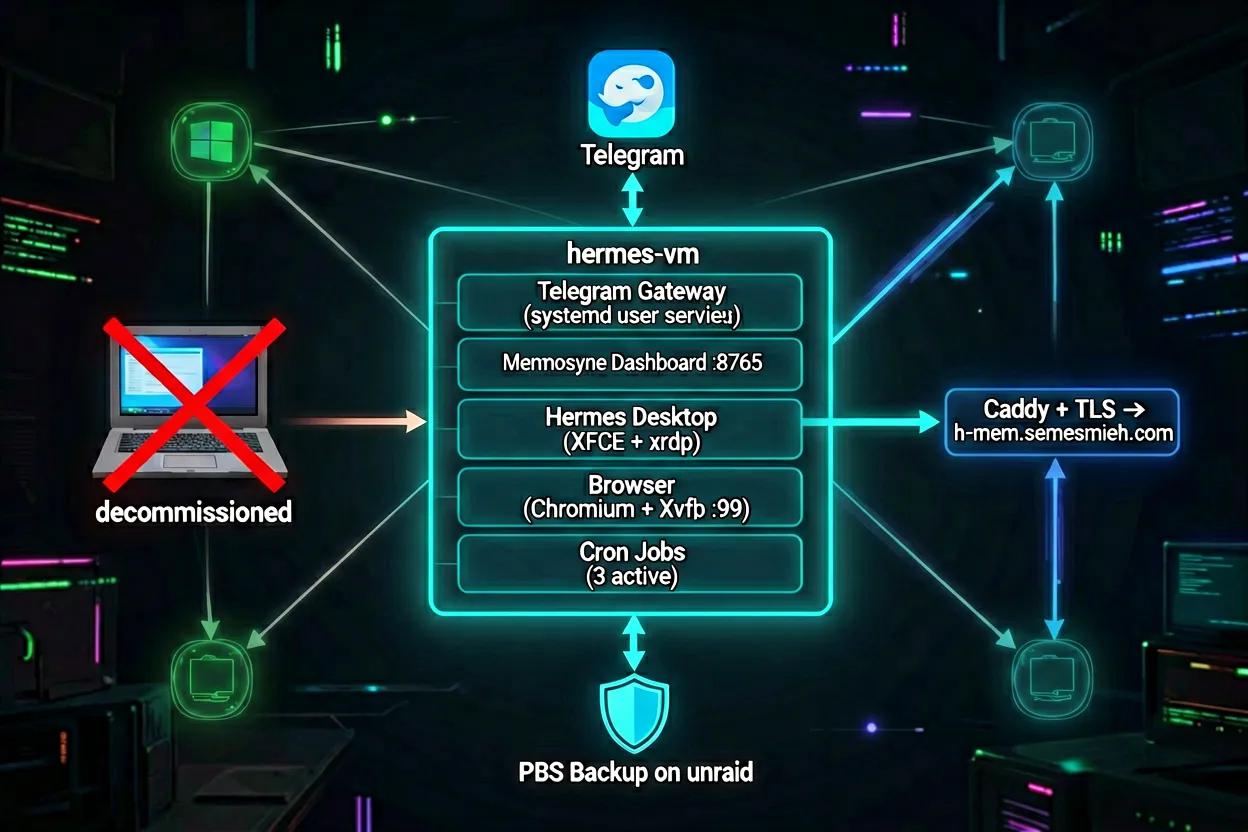
As of today, Hermes runs entirely from hermes-vm:
| Component | Where | How |
|---|---|---|
| Telegram gateway | hermes-vm | systemd user service, survives logout |
| Mnemosyne dashboard | hermes-vm:8765 | systemd system service, Caddy TLS frontend |
| Hermes Desktop | hermes-vm | Electron via XFCE + xrdp, --no-sandbox --disable-gpu |
| Browser tool | hermes-vm | Chromium + Xvfb on :99 |
| Cron jobs (3) | hermes-vm | Managed by gateway scheduler |
| PBS backup | unraid-pbs | Post-migration snapshot + full backup done |
The Windows laptop is a laptop again. No startup scripts, no gateway to keep alive, no risk that a Windows Update reboot silences my agent at midnight.
What's next
The VM is the new home. Next steps are operational hardening: monitoring the gateway with a healthcheck cron that alerts if it goes quiet, exploring whether the Mnemosyne embedding model can be pre-warmed on service start to avoid the first-message delay, and potentially adding a second PBS backup schedule now that the agent's data matters more. The brain is in a better body — time to see how it runs.